
The ZWO ASI2600MC Air Made My Life Easier: Here’s How


Key Takeaways
- The ASI2600MC Air is a 3-in-1 ‘smart camera’ that combines a dedicated astronomy camera with a guide camera and a WiFi controller that runs on the ASIAIR mobile app.
- The design dramatically reduces the amount of cables and accessories needed to run a complete deep-sky astrophotography imaging session.
- Critics dislike that this ‘niche design’ could lead to a scenario in which one of the three components fails (rendering the system useless) and that it limits users to the ZWO ecosystem.
ZWO has always been a great company to work with. They saw something special on my YouTube Channel way back in 2017 and have loaned me several cameras to test and review over the years.
When I tested one of their early dedicated astronomy cameras (an ASI071MC-Cool) 7 years ago, I had no idea of the overall impact they would soon have on the astrophotography community.

I took this picture of the Cave Nebula with the ASI2600MC Air camera.
Their coming-out party seemed to align with the launch of the highly polarizing ASIAIR WiFi controller and peaked with the incredible success of the Seestar S50 smart telescope in 2023.
While the astrophotography community seems to either love or hate the market ‘domination’ of ZWO, I think everyone can agree that they have dramatically impacted the hobby for the better overall. The company constantly innovates, improves, and keeps a close pulse on the amateur astrophotographer.
With all that out of the way, I’d like to introduce one of the strangest, no-one-saw-it-coming devices they have ever produced. The ZWO ASI2600MC Air.

The ZWO ASI2600MC Air is currently listed for $1,999 USD at Agena Astro.
The ZWO ASI2600MC Air
This astronomy camera is unlike any other you have ever used. It includes a built-in ASIAIR WiFi controller and an autoguiding camera. It’s truly an all-in-one device that significantly streamlines the astro-imaging experience.
Inside this camera/computer combo lies one of the absolute best CMOS astronomy camera sensors ever made, the Sony IMX571. This back-illuminated APS-C format native 16-bit ADC sensor is behind some of the best astrophotography images on the planet.
On top of the primary camera sensor, you’ll find a small secondary camera sensor built for autoguiding. This is the same CMOS sensor in the ZWO ASI220MM Mini guide camera.
The built-in ASIAIR WiFi controller is built into the camera body and adds very little to the camera’s overall size. But in case you forgot it was there, the angled black antenna is there to remind you.

The WiFi range on the ASI2600MC Air is listed at 20 meters (In my experience, it’s more like 10).
What’s So Special About It?
Even though I knew that this camera would save me from setting up my ASIAIR Plus device, an autoguiding camera, and a guide scope, I didn’t realize how freeing this new experience would be.
It’s just one camera threaded to the back of your astrophotography telescope. You just run power to the camera, connect your mount and accessories, and start imaging.
The camera includes 256 GB of internal storage, although you can also connect external storage when needed (I use a USB thumb drive).
Starting your astrophotography session on the ASIAIR mobile app is even easier. Once you have found your initial focus through your astrophotography telescope, you can start the polar alignment process and be on your way.
The guide sensor is designed to be parfocal with the main camera, although you may need to fine-tune its focus during the initial setup. You can start calibrating the secondary guide camera soon after.
I have never seen a cleaner astrophotography rig in my backyard, ever.
If you use a cable to control your telescope mount (I use this one), just plug the USB end into the back of the camera and the other into your mount. Done.
Advantages:
- 3-in-1 package for faster setup
- Fewer opportunities for cable snags
- On-axis guiding with better accuracy
- No differential flexure or other guide-scope issues
Disadvantages:
- Part of the ZWO ‘closed ecosystem’
- Potential problems if one component fails
- Not able to upgrade/change individual components (eg. guide camera)

The primary image sensor is 26 MP, and the guide sensor is 2MP.
What Others are Saying
While there are currently only a handful of units ‘in the wild’ being reviewed hands-on, the astrophotography community has some strong opinions on this product. Here are a few of the most prevalent thoughts about the ASI2600MC Air on X:
What are your thoughts on the ASI2600MC Air Smart Camera? 🤔 pic.twitter.com/fPQnTWaRbv
— 🔭AstroBackyard (@AstroBackyard) September 9, 2024
Value for the Price
While I know that $2,000 USD is a lot of money, you are getting one of the best astronomy cameras on the market, an ASIAIR on-board camera controller, and a ready-to-go autoguiding system in one.
I think the ASI2600MC Air has the potential to be one of the most popular astrophotography products of all time. Even seasoned astrophotographers who already own ASI cameras and an ASIAIR can benefit from an additional all-in-one package like this.
I regularly run multiple ASIAIRs (my record is 3 rigs running simultaneously), and this configuration frees up an additional guide camera and an ASIAIR.
At the end of the day, the camera alone is worth the price of admission. If you are already planning to buy an ASIAIR and guiding system, the Air version can offer compelling value.
If you already own those components (or want to use NINA or another computer-based platform) the less expensive ASI2600MC Pro may make more sense.
ASI2600MC Air Specifications
Primary Camera
- Sensor: Sony IMX571
- Sensor Size: APS-C (23.5 x 15.7mm)
- Pixel Size: 3.76 µm
- Resolution: 6248 x 4176 pixels (26 MP)
- ADC: 16 Bit
- FPS: 10.8 (at 1920 x 1080 resolution)
- QE: 80%
- Read Noise: 0.9e–4.2e
- Cooling Capacity: 30°C–35°C below ambient
- Internal Storage: 256 GB eMMC
- Memory: 2 GB DDR RAM
- Read/Write Speed: 138MB/s read, 112MB/s write
- WiFi: 2.4Ghz/5Ghz Dual-band Wi-Fi
- Full Well Capacity: 73Ke in extended full-well mode
- Interface: USB 2.0 x 4, Type-C x 1
The ZWO ASI2600MC Air has no amp glow, 14 stops of dynamic range, and the color model has a built-in UV/IR-cut protective window.

Guide Camera
- Sensor: SC2210
- Sensor Size: 1/1.8″ (7.68mm x 4.32mm)
- Resolution: 1920 x 1080 pixels
- FPS: 8.5
- QE: 92%
- Read Noise: 0.6e

The ZWO ASI2600MC Air is a Wireless Smart Camera with 3-in-1 Imaging, Guiding, and Control.
How is The WiFi Range?
The WiFi range is listed at 20 meters. While I noticed that it is much improved over the ASIAIR Pro, I have found the maximum distance I can achieve a strong signal to be about 10 meters (30 feet) away inside the house.
If you have never used a WiFi device to control your astrophotography sessions, you may be worried about losing the connection between your camera and telescope and your phone or tablet. The reality is that it doesn’t matter all that much if you temporarily lose the WiFi signal during your image acquisition session.
Your automated imaging plan will continue to run even if the signal is lost. You need to reconnect to the camera at a closer range, and then you can monitor your progress once more.
You will need to use the ASIAIR mobile app on Android or iOS devices to control the ASI2600MC Air.

Using the ASI2600MC Air with the Askar SQA55 on a portable star tracker.
Potential Problems
The critiques online seem to have one major issue with the ASI2600MC Air: What if something goes wrong with one of the components? While I am happy to report that after several nights, everything is working flawlessly, they have a point.
For example, if the ASIAIR WiFi controller developed an issue and no longer functions, your favorite astronomy camera could become an expensive paperweight. Unlike a modular system you have put together and customized yourself, this baby is a closed system.
Also, the duo guide camera system could be a problem with strong filters, and a ‘slow’ (F/7 or higher) telescope. The guide camera needs to ‘see’ a couple of stars that are bright enough to lock onto to function.
That said, I am pleased to report that my guiding was excellent. I used a strong Optolong L-eXtreme (dual-narrowband) filter in front of the guide camera, and my F/5.6 telescope and I was really surprised to experience that.
The Images I’ve Taken
Thanks to some fantastic late summer weather, I’ve had a few moonless clear nights to test the ASI2600MC Air from my light-polluted backyard (Bortle 6).
I decided to capture a deep-sky target I’ve never tried, NGC 6914, in the Cygnus constellation. You have probably seen this target in your wide-field images of the Sadr Region.
For this photo, I used a mix of data – the bulk of it from the ASI2600MC Air and an Optolong L-eXtreme filter (I felt the L-Ultimate was a little too strong).
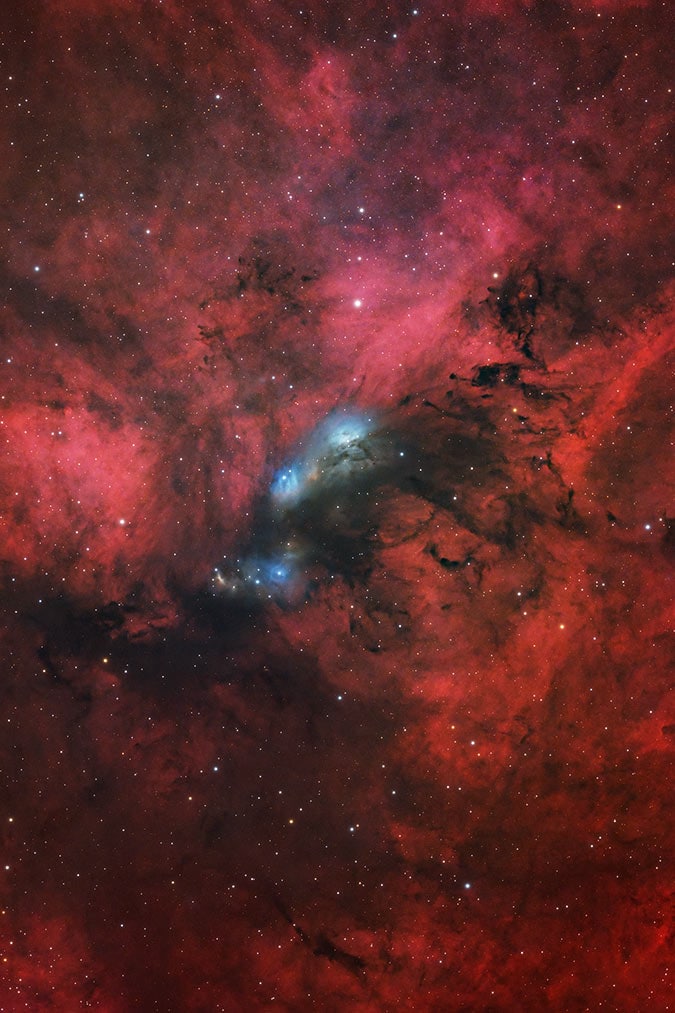
NGC 6914 in Cygnus. ZWO ASI2600MC Air + William Optics FLT 132 Refractor.
The next subject I chose to photograph was the beautiful Cave Nebula in the constellation Cepheus. This has always been one of my favorite targets to capture from the northern hemisphere during late summer and early fall.
I poured on the imaging time thanks to two consecutive moonless, clear nights in the backyard. I did not use a filter for this image to achieve a more natural-looking image with accurate star colors.
The Cave Nebula. ZWO ASI2600MC Air + William Optics FLT 132 Refractor (no filter).
To finish things off, I added a small stack of data captured with an H-alpha filter and the ASI2600MM Pro, a monochrome version of this camera sensor. While it was only about 2 hours of data, for this subject, it definitely helped the object ‘pop’ a little more.
Complete Setup Used
My William Optics FLT 132 hasn’t seen enough starlight lately, so it has temporarily taken the place of the Sky-Watcher Esprit 150 APO refractor for the time being.
The Sky-Watcher EQ8-R Pro and tri-pier are so heavy that I usually try to leave them outside for an extended period of time. When not in use, I protect them with a Telegizmos 365 cover.

- Camera: ZWO ASI2600MC Air
- Filter: Optolong L-eXtreme (for NGC 6914 only)
- Telescope: William Optics FLT 132 Apochromatic Refractor
- Reducer Lens: William Optics 0.8x reducer
- Mount: Sky-Watcher EQ8-R Pro
The system was quite clean without the need for my ASIAIR Plus WiFi controller, guide scope, or guide camera. Just one DC power adapter cable (12V 5A) to the camera and one to the mount.
Related Article: 10 of The Best Astrophotography Telescopes in 2026
ASI2600MC Air vs. Pro vs. Duo
All three cameras use the excellent Sony IMX571 APS-C color sensor, so the underlying image quality is essentially the same. The biggest differences involve guiding, equipment control, and how much flexibility you want in your setup.
| Camera | What’s Built In | Best For | Main Trade-Off |
|---|---|---|---|
| ASI2600MC Pro | Imaging camera only | Users who already own guiding and control hardware—or want to use NINA or another computer-based platform | Requires a separate guide camera, guiding solution, and controller or computer |
| ASI2600MC Duo | Imaging camera and guide sensor | Users who want integrated guiding but prefer to choose their own controller | Still requires an ASIAIR, mini PC, or laptop to control the imaging session |
| ASI2600MC Air | Imaging camera, guide sensor, and ASIAIR controller | ASIAIR users who want the cleanest and most integrated setup possible | Less flexibility if you want to change components or move outside the ZWO ecosystem |
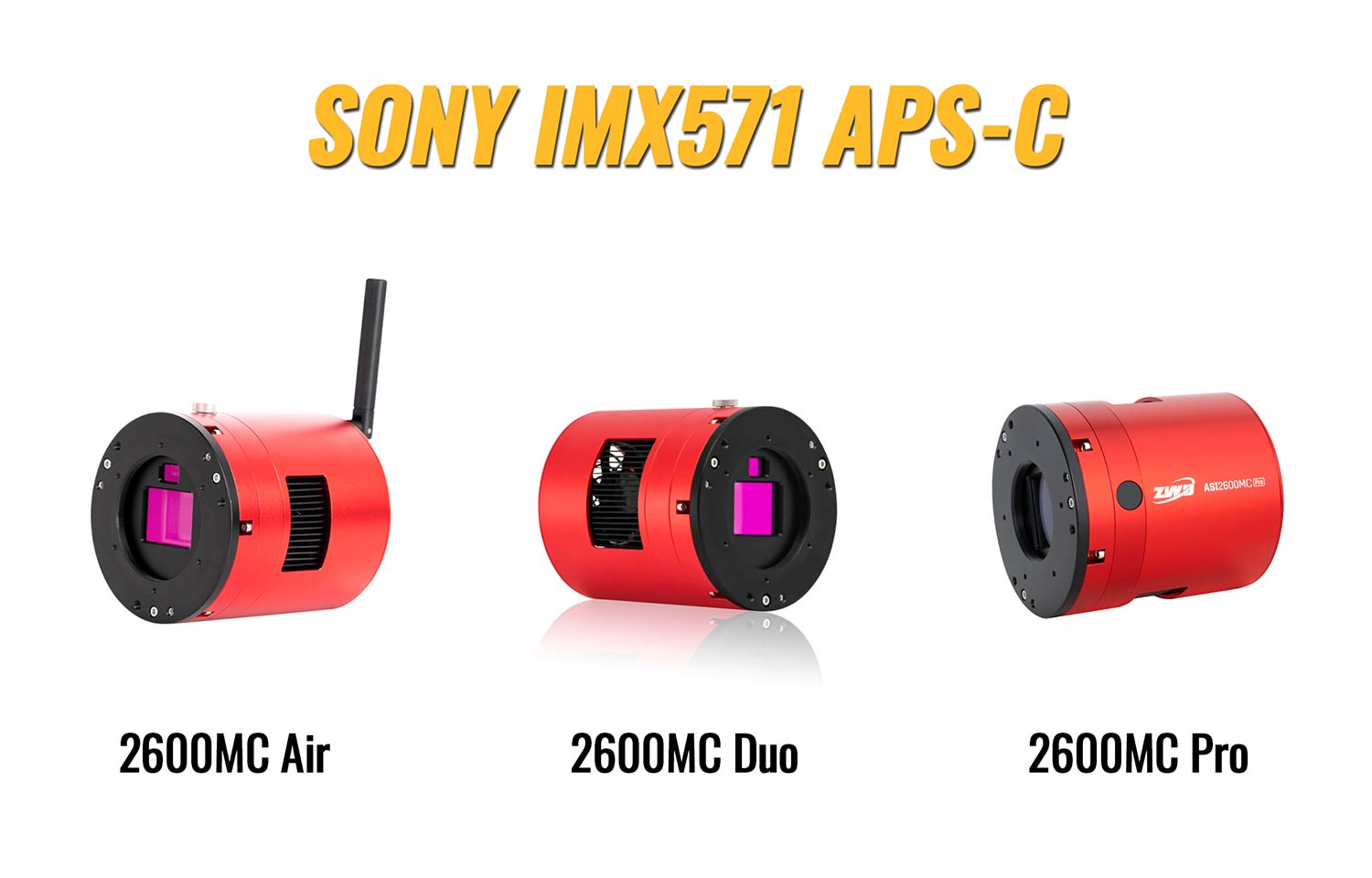
Choose the ASI2600MC Pro for maximum flexibility, the ASI2600MC Duo for integrated guiding without committing to a built-in controller, or the ASI2600MC Air for the simplest all-in-one experience.
Community Notes: Common Questions From ASI2600MC Air Owners
After reviewing discussions from ASI2600MC Air owners, several questions and concerns appear repeatedly. Most users appreciate the remarkably clean setup, but there are a few limitations worth understanding before choosing this camera.
Will the guide sensor work through a narrowband filter?
Yes, but the results depend on the filter, telescope, exposure settings, and number of available stars. Because the guide sensor looks through the same imaging train as the main sensor, a dual-narrowband filter also reduces the light reaching the guide camera.
Many owners successfully guide through filters such as the Optolong L-eXtreme, particularly with fast, wide-field telescopes. Finding a suitable guide star may become more difficult with extremely narrow filters, slower telescopes, long focal lengths, or sparse star fields. Increasing the guide exposure or using Bin 2 can sometimes help.
Will the guide sensor work with every telescope?
The telescope must provide a large enough image circle to illuminate both sensors. ZWO recommends an APS-C-sized or larger image circle. Telescopes with a restricted rear opening, small corrected field, or certain adapters may produce distorted or dim guide stars near the edge.
This does not necessarily prevent guiding, but the camera is best suited to refractors and astrographs that can properly illuminate an APS-C sensor. Compatibility deserves more attention when using an SCT, a telescope with a small image circle, or an imaging train containing restrictive adapters.
Can the ASI2600MC Air be controlled with NINA or a laptop?
The camera is designed primarily around the ASIAIR mobile app, but it can also communicate with supported Windows software through ASCOM Alpaca over a network connection. Owners have successfully connected the imaging and guide sensors to programs such as NINA and PHD2, although setup can be less straightforward than using a conventional USB astronomy camera.
Performance and compatibility have also changed through firmware and driver updates. If NINA is central to your workflow, the ASI2600MC Pro or Duo paired with a separate mini PC may provide a more conventional and flexible experience.
Are the USB ports fast?
The four accessory ports on the camera are USB 2.0. This is adequate for connecting equipment such as a mount, electronic focuser, or filter wheel, but they should not be mistaken for high-speed USB 3.0 camera connections.
The camera saves images directly to its 256 GB internal storage, so USB speed does not normally limit a standard deep-sky imaging sequence. However, some owners report that transferring an entire night of full-resolution files over Wi-Fi can take a while. The USB-C connection is the better option when moving a large amount of data to a computer.
What happens if the Wi-Fi connection drops?
A temporary loss of connection does not normally stop an imaging plan already running on the camera. The ASI2600MC Air continues capturing images and saving them internally, and you can reconnect to monitor the session.
Wi-Fi range varies significantly with walls, distance, interference, and whether 2.4 GHz or 5 GHz is being used. Some owners use station mode or a travel router to improve coverage around the home or observatory.
What if one of the integrated components fails?
This remains the most common long-term concern. The imaging camera, guide camera, storage, wireless controller, and accessory connections are combined into a single device. This creates an exceptionally clean setup, but individual components cannot be replaced or upgraded as easily as they can in a modular system.
Computer control through ASCOM Alpaca provides some additional flexibility, but it should not be considered a guaranteed backup if the camera’s internal control hardware completely fails. Buyers must decide whether the convenience of integration outweighs the repairability and flexibility of separate components.
My Take: The ASI2600MC Air makes the most sense for astrophotographers who already enjoy the ASIAIR experience and want the cleanest possible imaging rig. If you regularly use NINA, frequently change components, or want every part of the system to be independently replaceable, the ASI2600MC Pro or Duo may be a better fit.
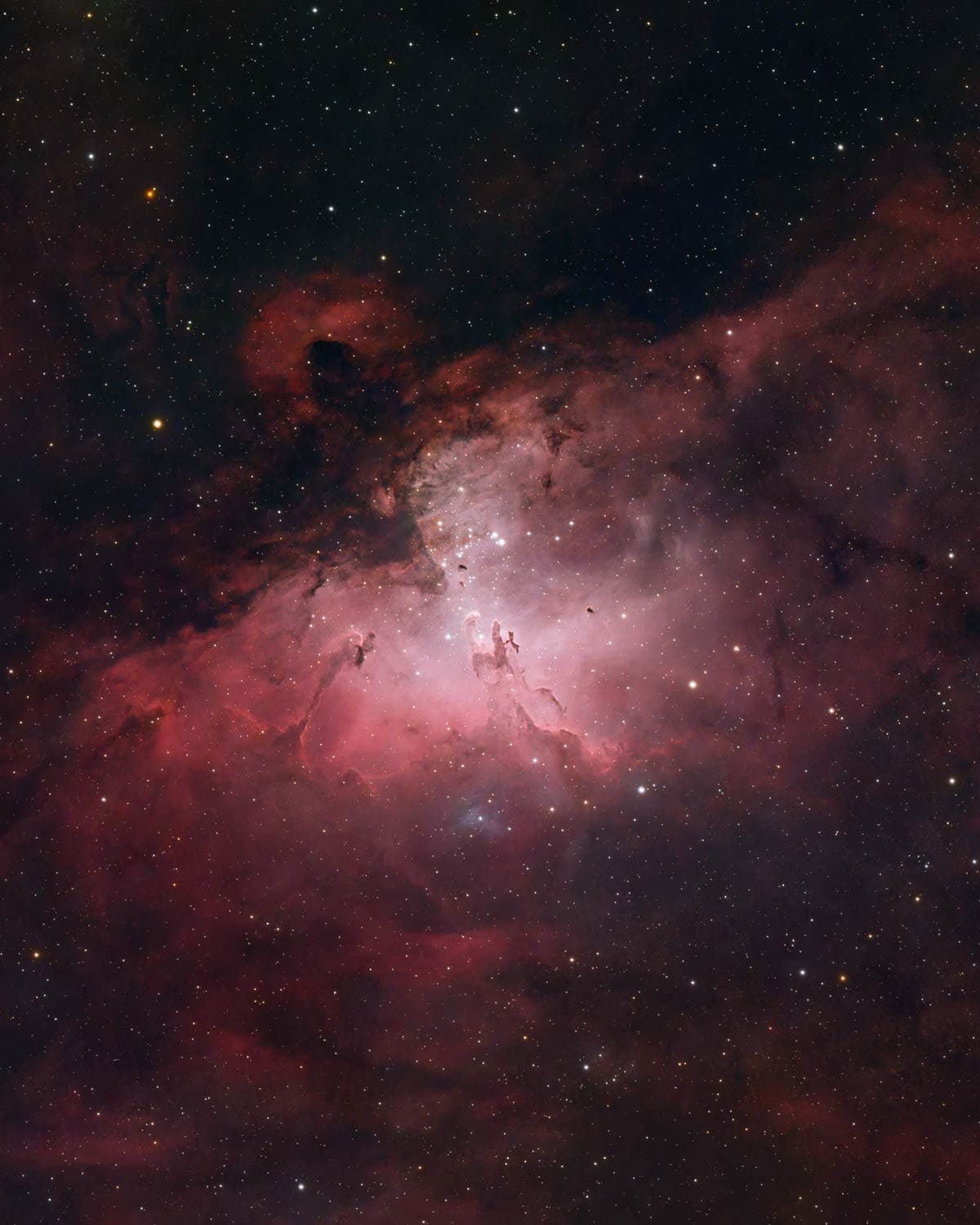
The Eagle Nebula. ZWO ASI2600MC Air + Askar SQA130
Image Processing
To process the images, I have been using my latest workflow, which involves creating a starless image relatively early on. This helps me really bring up the faint details without worrying about destroying star color and quality.
For the image of NGC 6914, I focused on bringing up the cool blue areas of the reflection nebula to contrast against the sea of red hydrogen. I used the Select and Mask tool in Adobe Photoshop to refine my selection around the blue nebulae and applied several iterations of curves to these blue tones specifically.
The RC Astro plugins like BlurXTerminator and StarXTerminator do an exceptional job at my edit’s key stages (deconvolution and star removal). You can learn about this entire process in my recently updated astrophotography image processing guide.
It is always free for existing customers to update the guide to the latest version.

The image processing guide is over 130 pages and includes exclusive video tutorials.
Final Thoughts
The ZWO ASI2600MC Air is unlike anything else on the market. It’s an incredible accomplishment in innovation and design, and I am thoroughly impressed with the images I’ve taken with it.
You can undoubtedly capture images of a comparable quality using the non-Air version of this camera. Still, you would miss out on the ‘don’t knock it until you try it’ user experience this device offers.
I doubt anyone who already owns an ASI2600MC Pro (or Duo) will feel the need to upgrade, but if you love that sensor and want to run an additional rig, you might be able to justify the impulse purchase.
If you already enjoy using the ASIAIR mobile app on your smartphone or tablet, this camera would be a great addition to your growing astrophotography equipment collection.
As long as no major issues arise and ZWO maintains high-quality control at the factory, I think the ASI2600MC Air has the potential to be an extremely successful product for years to come.
As always, I am not paid to endorse the product, or obligated to provide a positive review. The company has no input into what I share with my audience.

The Andromeda Galaxy captured with the ZWO ASI2600MC Air. See my full process behind this image.

Trevor Jones is a deep-sky astrophotographer and valued member of the RASC. His passion is inspiring others to start their astrophotography journey on his YouTube Channel so they can appreciate the night sky as much as he does. His images have been featured in astronomy books & online publications, including the NASA Astronomy Picture of the Day (APOD).

Having just had an ASIAIR Pro go dead on me suddenly in the midst of a (solar) imaging session, I am wary of getting an all-in-one camera-guide camera-computer, but I used to say the same thing about all-in-one printer-scanner-copiers, and here we are unable to buy anything else (practically). It does look like it simplifies set up and avoids cable issues.
Hello Trevor – One more thanks for your expert opinion on this remarkable new product from ZWO. As I’m actually using a rig with the ZWO ASI Pro, ZWO AM5 and the ASI 2600 MC Duo I think I’m too late to purchase the new ASI 2600 MC AIR.
One of the concerns about the integrated guiding camera is the performance with installed filters. From my experiences it works fine even on a slower telescope as with my ASKAR 103 APO with f/6.8. I usually do shots of 300 seconds from my Bortle 5 backyard with an Optolong L-Extreme filter.
You should have no problem guiding with the L-extreme filter. In my tests, the guiding was great with the stronger L-ultimate filter in place – using an F/6 refractor!
Very nice and useful review. I have a somewhat awkward question: is it possible to control the ASI2600MC-Air with a standalone ASIAir Plus rather than using the one integrated into the camera? Don’t ask me why one would want that, though.
Not sure the answer to this. WHY someone would want this is to overcome the hardware shortcoming in this 3-in-1 device.
I grabbed the ASI2600MC Air partly based on this review. (Great review overall, by the way). Unfortunately, what isn’t fully explored are the inherent limitations with this camera. The ASIAIR is based off the Mini model, not the Plus model, which is weird given that the camera is newer than the ASIAIR Plus.
This creates some really bad limitations: ALL USB ports are limited to USB 2.0 speeds, INCLUDING the USB-C format port. ZWO implies that USB-C is a faster port for quicker image transfer but, nope, it’s USB 2.0 (~30MB/s). This means pulling photos after an overnight shooting session takes forever.
Unfortunately, this means you can’t get faster speeds by using a separate ASIAIR Plus connected to this camera… also means that if you use a USB flash drive to capture real-time images, writing images will slow way down, which will slow down the entire photo capture/processing process (if using the Live stacking feature).
Overall, if considering this camera, a user would be better served buying the ASI2600MC/MM Duo and pairing with a far more capable ASIAIR Plus.
Excellent piece of kit if what you’re after is simplicity and a clean one cable setup. Otherwise, far too many hardware performance limitations.
Great points, Guy! I have never noticed the slow image transfer – I guess its fast enough for me to not even notice. I could see how live-stacking could get bogged down.