
Does Light Pollution Cause Noise in Astrophotography?

When you capture the night sky from a city or suburban backyard, the biggest enemy is light pollution. As a backyard astrophotographer, this one hurts.
The excess artificial light from streetlamps, houses, and buildings brightens the background of your astrophotography images.
This brighter sky background reduces your signal-to-noise ratio (SNR), which means the faint details of galaxies and nebulae get buried under a layer of unwanted glow.
In other words, the more light pollution you have, the noisier your images will appear, no matter how long you expose.

I drove an hour from home to a dark sky (Bortle 4) location to capture this image of the Rho Ophiuchi Cloud Complex.
In photography, the term noise refers to any unwanted variation in an image that doesn’t represent the true subject. These variations can come from stray or unwanted light, such as skyglow or nearby streetlamps, or from random electronic fluctuations in the camera sensor itself.
Both sources of interference show up as grain, speckles, or uneven tones across the frame. In astrophotography, where we’re trying to capture faint details in the night sky, even small amounts of this noise can overwhelm the actual signal from stars and deep-sky objects.
Why Light Pollution Increases Noise in Astrophotography
Every camera sensor collects both the signal (the photons from your target object) and background noise (unwanted light and random electronic variations).
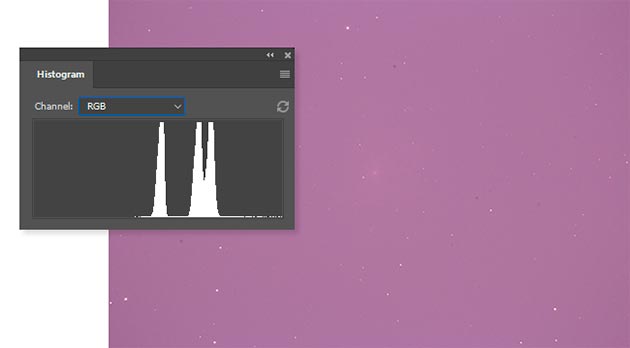
A single sub-exposure image captured with my DSLR camera from the backyard. Notice how washed out and noisy the image is.
Under dark skies, the background is relatively dim, so the target signal stands out. But under heavy light pollution, the background is already bright and fluctuating, which makes it much harder to distinguish faint details.
This results in:
-
Washed-out images with less contrast
-
Strong gradients across the frame
-
The need for more aggressive noise reduction in processing (which can erase real detail)
Here are some effective strategies to combat light pollution and the noise it generates.
1. Use Light Pollution Filters
Filters are one of the most effective tools for backyard astrophotographers. In my own setup, I often use the Optolong L-eXtreme filter with a one-shot color camera.
It blocks most unwanted wavelengths from local light sources while allowing the critical emission lines (H-alpha and OIII) to pass through. This makes a huge difference when imaging nebulae from my Bortle 7 backyard.
2. Capture More Sub-Exposures
Stacking is your best friend. The more exposures you collect, the better your final signal-to-noise ratio will be. Even under bright skies, stacking dozens or hundreds of sub-frames dramatically reduces visible noise.
My favorite image stacking software is DeepSkyStacker (mainly due to speed and familiarity), but I have also had excellent results using the WeightedBatchPreProcessing script in PixInsight.

A single sub-exposure image from my Rho Ophiuchi Cloud Complex photo isn’t pretty. But after stacking over 2 hours’ worth of data, a useful image was revealed.
3. Travel to a Dark Sky Site
Nothing beats the difference of shooting under Bortle 3 skies compared to Bortle 7 or higher. Use the light pollution map to plan your trip with your portable rig.
You’ll notice that the images you take will contain cleaner data with a better signal, even with shorter exposures.
Some of my favorite deep-sky imaging sessions were when I brought my portable star tracker to a remote location with little to no light pollution.
4. Use Gradient Removal in Processing
Software tools like PixInsight’s Dynamic Background Extraction (DBE) or Astro Pixel Processor’s Light Pollution Removal tool are designed to remove gradients caused by local light sources.
I often use the RC Astro GradientXterminator filter in Adobe Photoshop or PixInsight. Recently, I have found the GraXpert tool to work wonders on my broadband one-shot color images.
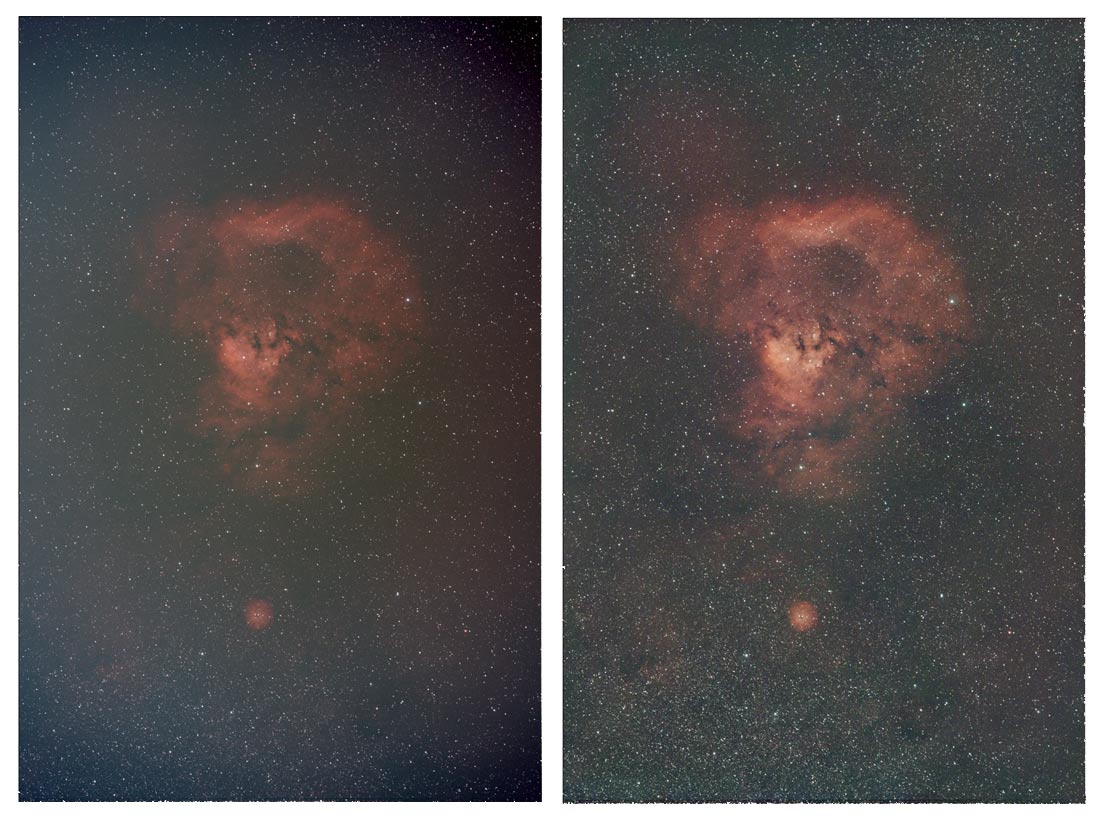
The GraXpert gradient removal tool works wonders on astrophotography images taken under light-polluted skies.
Smart Telescopes Answer to Noise
Smart telescopes are beginning to change the way beginners tackle light pollution and noise. Devices like the Seestar S50 use live stacking to automatically combine dozens (or even hundreds) of short exposures in real time.
This process averages out the random noise while strengthening the faint signal from your target, so even under bright suburban skies, you can see nebulae and galaxies appear with surprising clarity.
Instead of fighting gradients and grainy single frames, the telescope delivers a much cleaner image on your screen right away, giving newcomers a way to overcome one of the biggest challenges in backyard astrophotography.

The Dwarf 3 smart telescope effectively uses live stacking to produce a much cleaner image than a single frame from a light-polluted environment.
The Benefits of Narrowband Imaging
By using a monochrome camera and narrowband filters, you can largely ignore light pollution and target narrow emission lines.
Narrowband filters isolate a very narrow emission line in the spectrum, almost eliminating the effect of light pollution.
That’s why many astrophotographers in cities (including me) focus on nebula projects with H-alpha, OIII, and SII filters; the signal cuts right through the glow.
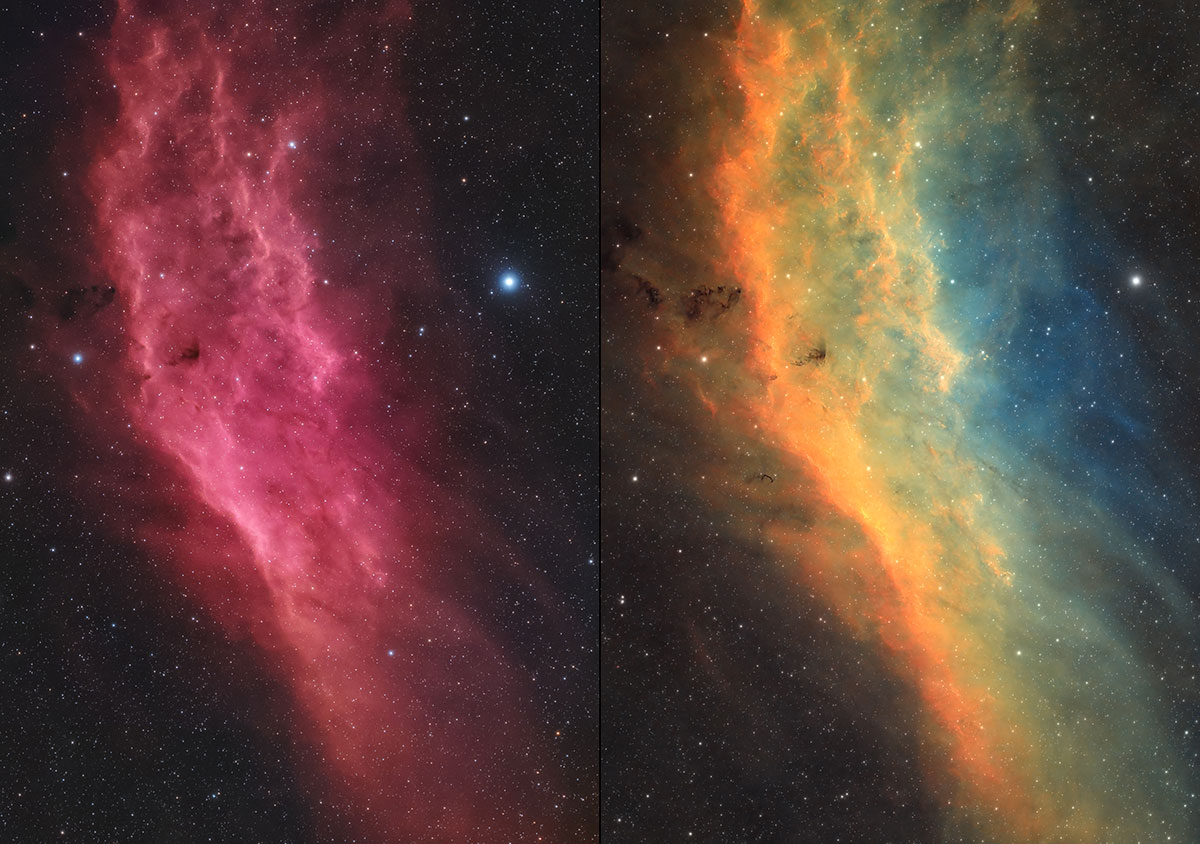
The photo on the left was captured with a broadband light pollution filter, while the one on the right was captured through narrowband filters in the Hubble Paleete.
Final Thoughts
Light pollution doesn’t just wash out the stars, it directly increases the noise in your astrophotography images. After over a decade in this hobby, I can tell you firsthand how important the signal-to-noise ratio really is.
By understanding the relationship between sky brightness and noise, you can take steps to minimize its impact. While it’s nice to travel to darker skies for serious projects, the backyard is where I do the majority of my astrophotography.
Whether you use filters, stack more exposures, remove gradients in software, or plan a dark sky trip, there are plenty of ways to produce clean, detailed astrophotos from less-than-ideal locations. I hope that these tips help you take better images from your backyard.
Trevor Jones is an astrophotographer and a valued member of the RASC. His passion is inspiring others to start their astrophotography journey on YouTube so they can enjoy the night sky as much as he does. His images can be seen in astronomy books & online publications, including the NASA Astronomy Picture of the Day.